
FLUX.1 vs Midjourney v7 for Photorealistic Portraits: Prompt Engineering & Lighting Comparison
The Battle for Photorealistic AI Portraits
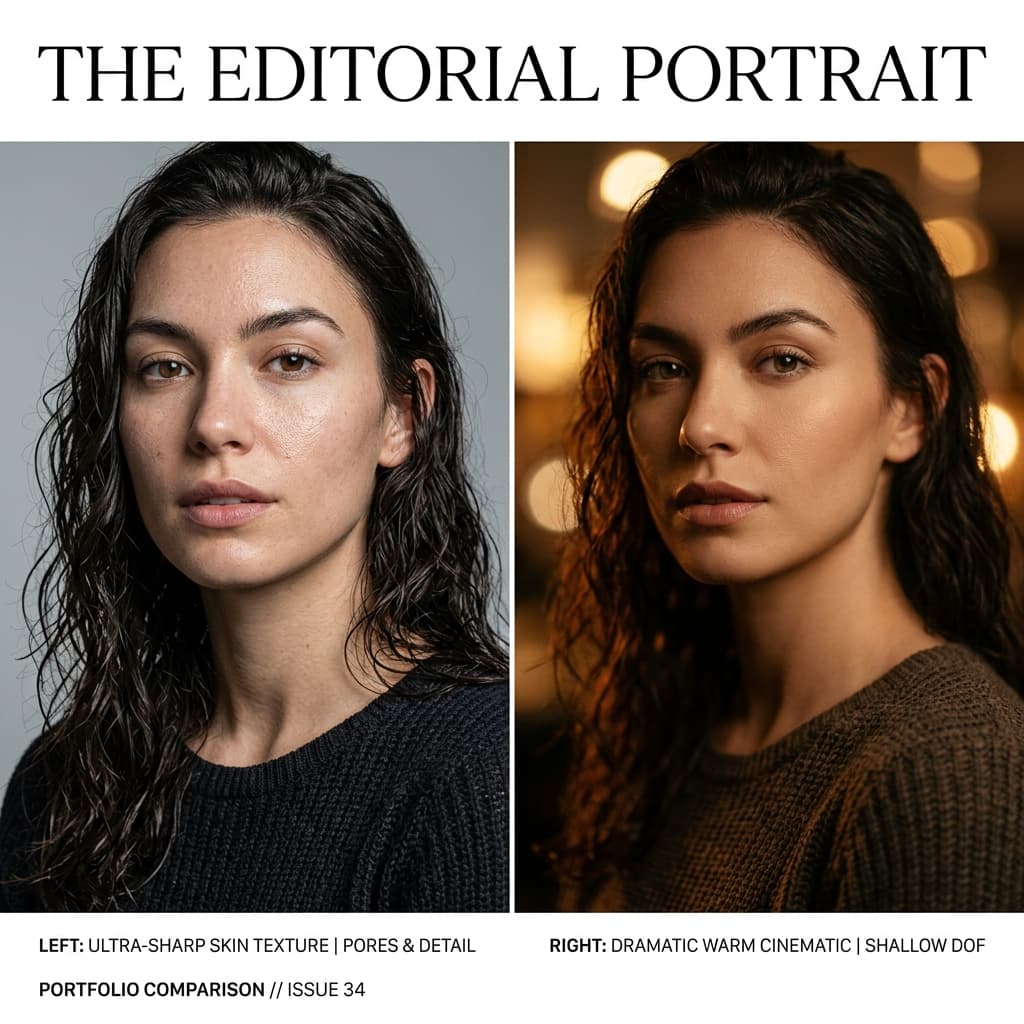
TL;DR: Choose FLUX.1 if you need clinical optical photorealism, precise skin texture, and literal camera syntax adherence (such as exact lens focal lengths and f-stops). Choose Midjourney v7 if your primary goal is artistic composition, cinematic mood, painterly lighting, and emotional character depth.
If you have spent any real time generating portraits with AI image models over the past year, you already know the frustration: one generation looks like a crisp studio RAW file, while the next looks like a wax sculpture smeared with petroleum jelly.
With the release of FLUX.1 (specifically Flux 1.1 Pro and Pro Ultra) and Midjourney v7, the landscape of generative AI photography has shifted significantly. Both models can produce jaw-dropping photorealistic output, but they approach visual rendering from completely different architectural philosophies.
Think of it this way: Midjourney v7 is a cinematic director. Give it a concise mood and set the style parameters, and it will compose a dramatic, painterly, and emotionally resonant shot. FLUX.1 is a literal Director of Photography (DP). Give it a technical shot list—down to lens focal length, aperture setting, color temperature, and key-to-fill ratio—and it will execute your exact optical instructions with clinical precision.
In this guide, we will break down how FLUX.1 and Midjourney v7 handle portraiture, dissect exact prompt engineering structures, test photographic lighting syntax, and provide copy-paste prompt recipes you can use right away.
If you are looking for ready-to-use prompt packs specifically tailored for Midjourney, check out our collection of 20 Cinematic Portrait Prompts for Midjourney v7 for immediate copy-paste recipes.
Which AI Model Is Better for Photorealistic Portraits? FLUX.1 vs. Midjourney v7
Before writing prompts, it is crucial to understand the baseline biases of each model engine.
| Feature / Trait | FLUX.1 (1.1 Pro / Pro Ultra) | Midjourney v7 |
| :--- | :--- | :--- |
| Core Strength | Clinical photorealism, exact skin pores, anatomical accuracy | Cinematic lighting, emotional depth, balanced composition |
| Prompt Style | Detailed natural language, technical camera & lens syntax | Concise phrases, parameter tuning (--style raw, --s, --no) |
| Depth of Field Default | Natural to deep (obeys specified aperture like f/4 or f/8) | Extremely shallow depth of field (heavy background blur by default) |
| Skin Micro-Detail | High-frequency pores, vellus hairs, subtle tone variations | Smooth skin by default; requires explicit parameter dampening |
| Text Rendering | Flawless typography integration on backdrops/clothing | Improved text support, but occasionally distorts tiny labels |
FLUX.1: Optical Accuracy and Literal Prompting
FLUX.1 excels when given detailed, camera-native language. If you specify an 85mm lens at f/2.8 with 5500K neutral daylight, FLUX.1 translates those numbers into realistic perspective compression and believable light falloff. It rarely pushes artificial vignetting or stylized color grading unless explicitly requested.
Midjourney v7: Mood, Vignetting, and Aesthetic Polishing
Midjourney v7 possesses an inherent "aesthetic engine." By default, it leans toward flattering key lights, rich color contrast, and heavily blurred backgrounds. To get raw, unpolished photographic reality from Midjourney v7, you must actively counteract its beautification tendencies using parameters like --style raw, lower --s (stylize) values between 50 and 100, and strict --no negative flags.
Photographic Lighting Syntax: Master Class
Lighting is the single most important factor when transforming an AI generation from a 3D-looking digital render into an authentic photograph. When building prompts for both models, structure your lighting descriptions using five core variables: Pattern, Source, Direction, Softness, and Kelvin Temperature.
[Lighting Pattern] + [Light Source/Modifier] + [Direction Angle] + [Softness/Contrast] + [Color Temp (Kelvin)]
Key Lighting Patterns to Test
- Rembrandt Lighting: Characterized by a small triangle of light on the shadowed cheek. Creates dramatic depth for male portraits and character studies.
- Loop Lighting: A soft shadow of the nose falling down toward the corner of the mouth. The standard choice for commercial and editorial headshots.
- Butterfly (Paramount) Lighting: Key light placed directly overhead and above camera level, creating a butterfly-shaped shadow under the nose. Popular in high-end beauty shoots.
- Split Lighting: Key light hits the face at a 90-degree angle, illuminating exactly half the face while leaving the other half in shadow.
Real-World Case Studies & Copy-Paste Prompts
Let's examine two distinct real-world portrait scenarios: an editorial commercial headshot and a cinematic moody studio shot.
Case Study 1: The Corporate & Editorial Beauty Headshot
For editorial and corporate work, we need clean skin texture, even lighting balance, and natural facial features without excessive beauty filtering.
FLUX.1 Prompt Recipe: Clean Editorial Portrait
Professional editorial beauty headshot of a 32-year-old Scandinavian woman, neutral expression, subtle natural smile. Shot on Hasselblad H6D-100c with 100mm f/2.2 macro lens, f/4 aperture, ISO 100, 1/160s shutter. Butterfly lighting pattern created by a large 47-inch octabox key light positioned directly overhead and a silver reflector fill below. 5500K neutral white balance. Visible facial skin pores, delicate vellus hair on jawline, minor natural skin tone variations, light freckles on nose bridge. Crisp focus on irises with catchlights, clean white studio background. Photorealistic RAW photograph, non-airbrushed, no plastic sheen. --ar 4:5
Midjourney v7 Prompt Recipe: Clean Editorial Portrait
Professional editorial headshot of a 32-year-old Scandinavian woman, shot on 100mm lens, f/4 aperture, ISO 100, butterfly lighting pattern with overhead softbox, 5500K neutral daylight, visible skin pores, subtle freckles, crisp iris catchlight, white studio background, photorealistic RAW photograph --style raw --s 75 --ar 4:5 --no airbrushed skin, waxy skin, plastic, 3d render, cartoon, blurred face
Key Engineering Takeaway
Notice how the FLUX.1 prompt uses full, descriptive prose detailing the camera body and octabox modifier size. In contrast, the Midjourney v7 prompt relies on --style raw --s 75 alongside explicit --no exclusions to prevent the model from turning the skin into smooth porcelain.
Case Study 2: The Moody Cinematic Character Portrait
When the objective is visual drama, rich chiaroscuro, and emotional impact, Midjourney v7 truly shines, though FLUX.1 can match it when given explicit shadow instructions.
Midjourney v7 Prompt Recipe: Dramatic Rembrandt Noir
Cinematic close-up portrait of a mature 50-year-old male craftsman in his dark workshop, deep Rembrandt lighting from a single low-set window key light, 45-degree angle, tungsten warmth, 3200K color temperature, strong shadow falloff on right cheek, shallow depth of field, shot on Leica M11 with 50mm Summilux f/1.4 lens, realistic skin wrinkles, subtle dust particles in light beam, film grain, atmospheric depth --style raw --s 140 --ar 16:9
FLUX.1 Prompt Recipe: Dramatic Rembrandt Noir
Cinematic portrait of a 50-year-old male craftsman in a dark woodworking workshop. Single hard key light source through a small window at 45 degrees, creating a classic Rembrandt light triangle on the shadow cheek. 3200K warm tungsten illumination, deep shadow falloff, high contrast atmosphere. Shot on 50mm f/1.4 lens, f/2.0 aperture, ISO 400. Clear focus on weathered skin texture, natural forehead creases, fine facial hair stubble, subtle dust motes floating in light beam. Authentic documentary film photography look, raw texture, realistic shadow tones. --ar 16:9
The 5-Layer Skin Realism Framework
To prevent the dreaded "AI polish," we recommend structuring your skin descriptions across five distinct visual layers:
- Base Complexion: State skin undertones (e.g., "olive skin undertones", "pale freckled complexion").
- Subsurface Light Behavior: Include phrases like "natural subsurface scattering" or "translucent skin light absorption" to evoke organic tissue rather than solid plastic.
- Micro-Texture: Explicitly mention "visible pores in T-zone", "dermatological texture", and "delicate vellus facial hair".
- Natural Imperfections: Include age-appropriate details such as "subtle laugh lines around eyes", "faint capillary detail near nostrils", or "slight uneven redness".
- Lighting Micro-Shadows: Use directional side light (
45-degree key) to cast tiny micro-shadows across pores and skin ridges, visually proving the depth of the texture.
Negative Prompting & Parameter Quick Reference
When working in environments that support negative prompting or parameter flags, use this reference block to keep skin looking authentic:
Universal Negative Block (Midjourney --no & Stable Diffusion)
--no airbrushed skin, plastic skin, waxy texture, smooth skin filter, beauty blur, glossy eyes, 3d render, illustration, digital painting, CGI, extra fingers, deformed iris, over-sharpened edges
Aperture Quick-Reference Table for Camera Syntax
| Aperture Setting | Visual Result | Recommended Model Use Case | | :--- | :--- | :--- | | f/1.4 – f/1.8 | Dreamy, ultra-shallow DOF; background completely blurred | Midjourney portraits (artistic, intimate) | | f/2.8 – f/4 | Subject face sharp, ears and background softly blurred | Both models (standard portrait choice) | | f/5.6 – f/8 | Entire head, hair, and environmental background in crisp focus | FLUX.1 (editorial & corporate group shots) |
Final Verdict: Which Model Should You Use?
- Choose FLUX.1 if your project demands commercial photorealism, exact skin detail, accurate corporate headshots, or strict adherence to specific lens and aperture numbers.
- Choose Midjourney v7 if your primary goal is mood, storytelling, cinematic atmosphere, dramatic color palette, or stylized visual impact.
By combining structured camera syntax, precise lighting parameters, and multi-layered skin descriptions, you can unlock professional photographic quality across both generators.
For more hands-on tutorials on optimizing mobile shot composition and depth control in physical camera environments, read our guide on iPhone Portrait Mode Tips for Studio Quality Photos.

Written by S.Sandaruwan
Tested by experienced digital photographers and prompt engineers. Every AI prompt, camera parameter breakdown, and editing preset is rigorously benchmarked across rendering engines and physical hardware.
You Might Also Like
20 Cinematic Portrait Prompts for Midjourney v7
20 tested cinematic portrait prompts for Midjourney v7, grouped by mood, with sample renders and copy-paste prompt text for immediate use.
iPhone Portrait Mode Tips for Studio Quality Photos
Discover actionable iphone portrait mode tips to elevate your mobile photography. Learn edge separation, focal lengths, and post-editing depth control.
Golden Hour Phone Photography: The Complete Guide
Master golden hour photography with your smartphone. Timing, composition, exposure techniques, and editing tips for warm, cinematic shots.
Film Look Lightroom Presets: Free Pack with Build Notes
Download 5 free film-emulation Lightroom presets with full build notes explaining every slider choice so you can adapt them to your style.